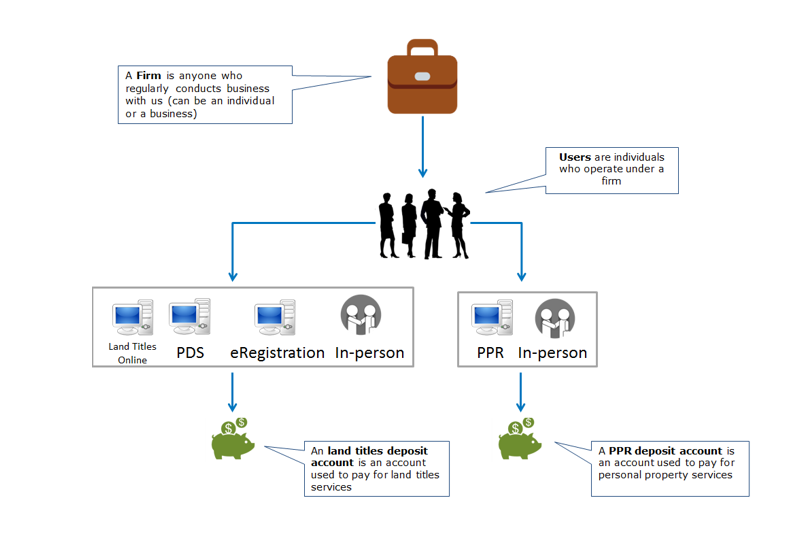
Firm and account administrators are initially defined when you apply for access. Your firm and account administrators can be the same.
| User type |
Max # per firm |
Permissions |
Communications received |
| Firm contact |
One |
- Use our online services (A user ID must be requested).
|
- General communications to distribute throughout the office.
|
| Firm administrator |
Two |
- Use our online services.
- Use the online services maintenance application to:
- Update user email addresses.
- Activate/inactivate user access to the firm.
- Use our client application form to:
- Add/remove deposit accounts.
- Add/remove online services.
- Add new users to the firm.
|
- General communications to distribute throughout the office.
|
| Land titles deposit account administrator |
Two |
- Use our online services.
- Use the online services maintenance application to:
- Add/remove users from the land titles deposit account.
|
- eReceipts.
- Account statements (emailed and/or accessed via maintenance online).
|
| PPR deposit account administrator |
Two |
- Use our online services.
- Use our client application form to:
- Add/remove users from the PPR account.
|
- Account statements (accessed via PPR online).
|
| User |
Unlimited |
|
- Status of title/instrument upon acceptance.
- Online services confirmations and notices.
|
Firm Structure